10 easy ways to protect yourself from cyber attacks
How to prevent a cyber attack
Whether you were raised on technology, or just hyper diligent, you probably think you’re pretty cyber savvy. But most of us have unknowingly had our cyber safety threatened.
Did you know that in 2025, Australians lost over $334 million to online scams?
Your personal information can be destroyed - or you can lose your savings, identity, livelihood or worse.
The good news is, you can beat the scammers at their own game! Follow these ten quick, easy steps and protect yourself today.
How to protect yourself from cyber attacks
Use your smarts, and technology, to be cyber-secure – at home, at work, at uni or out in the world.
1. Check if you’ve already been involved in a data breach
Before you begin to put steps into place to protect yourself against cyber attacks, ensure you haven’t already unknowingly been the victim of one.
Visit haveibeenpwned.com and change those passwords for any accounts that it suggests may have been compromised.
Oh no – my data has been compromised! What should I do?
First things first – stay calm. It depends on the nature of the breach, but you may need to act quickly.
If only the username and password of an unimportant account has been stolen, that’s possibly a low-level concern. If your phone number has been released, then you’ll need to keep an eye and ear out for scams – be discerning of any calls or text messages coming from random numbers (or even allegedly ‘trusted’ numbers).
You should change the password for the affected account right away. If you use the same password for other accounts, or one that is similar, make sure you change them too.
Think about changing your passwords for:
- your bank accounts
- health and government services
- social media accounts.
And if changing a password triggers a prompt asking you to sign out of that account on all other devices, say yes.
2. Check the strength of your passwords
Test the strength of your passwords using the Victorian Government Password Strength Tester (for an extra security measure, use something similar to your original password to test its strength).
When choosing a password, remember: the longer it is, the stronger it is. A strong password uses 14 or more characters and is hard to guess.
Or upgrade your cyber security measures with a passphrase
Using a passphrase – 3 or 4 random words – is a great way to create a unique password that you’ll never forget. The Australian Government now recommends you use a unique passphrase on every account.
Something like “Don't Swim With Sharks” is easier to remember and much stronger than “D3nt@o9e”. Hint: spaces usually count as special characters!
Creating a different, unique passphrase for each of your accounts stops hackers in their tracks and keeps you from being vulnerable to easy attacks.
Password managers, like Dashlane, have a built-in passphrase generator to help you make and save new ones on the go.
3. Avoid these passwords
The following passwords are considered the most common and easiest to crack – so if you’ve got any of these or similar variations, you should seriously consider changing them – quickly!
- 123456 (or any chronologically-ordered numbers)
- 987654321
- 123123
- QWERTY
- 111111
- Password
4. Use a password manager
Sick of trying to remember all your passwords, or having to change them every time you login?
Choose a password manager to safely store and create passwords for you. They're very convenient as you can use a master password (or faceID/fingerprint) to login after you set it up and can link it across all your devices.
A password manager will help you create strong, unique passwords/passphrases for your work and personal accounts. Password managers not only securely store passwords, card details, and other secrets but also help autofill websites for login efficiency.
VU Cyber has partnered with Dashlane to provide VU students with a free password manager.
Dashlane stores your passwords and keeps them up-to-date across your:
- phone
- computers
- tablets
- other devices, including personally owned devices.
All VU students and staff have access to a free account. Taking advantage of the free Dashlane account also lets you monitor your details for exposure on the dark web.
5. Use multi-factor authentication
For an extra layer of security, enable multi-factor authentication (MFA) wherever possible. Sometimes known as two-factor authentication (2FA), it gives you a chance to review and approve logins so you can monitor any that aren't by you.
There are multiple ways you may be asked to prove your identity, but your phone is usually key. You may log into your bank software, to be prompted for a pin. Or get a request to use an MFA app such as Microsoft Authenticator when accessing your work emails.
See more information about setting up and using MFA at VU.

6. Always verify (emails, phone or message)
We live in a digital world that makes it nearly impossible to never click anything. Trusting all that you see would also be extreme, so the balance is to make sure you verify what you see or receive with a trusted source. This means checking emails, websites, social media, messages, and phone calls are legit by running them by someone you know, or going to the source via a trusted online search engine or calling the published phone number.
Blindly interacting with links in emails, messages or downloads puts your information at risk and can land malware on your device. Remember:
- go slow in your emails – look for red flags and emotional triggers
- don't answer callers or reply to senders you don't know
- avoid risky clicks – instead, look up the address in your browser.
Hackers and scammers are getting more sophisticated. Protect yourself from a cyber attack by being discerning about any messages you receive, particularly if they ask you for personal info or your credit card details.
If, for example, your bank supposedly calls and leaves a message and number, always check the number on the official website before you ring back.
And whatever you do, do not give out your personal information over the phone or in an email, unless you’ve double-checked it’s safe. You don’t want to fall victim to ‘social engineering’, which is where people are tricked into providing sensitive personal information by people who sound legitimate but are actually bad actors.
If you are contacted on the phone by someone asking for personal information, ask for their name and number, and tell them you’ll call them back. Just because they might have some of your information, doesn’t mean they are who they claim to be.
7. Secure your device
If your mobile device is unsecured, lost or stolen, it could be used to access your info, your money or steal your identity and irreplaceable data like photos or messages.
Secure your devices by:
- installing anti-virus software
- setting a password, gesture or fingerprint that must be entered to unlock
- setting the device to require a password or PIN before applications are installed
- leaving Bluetooth and Wi-Fi off when not in use and disabling automatic connection to networks
- enabling remote locking and/or wiping functions, if your device supports them.
8. Update your software
Make sure you routinely update the software system on your devices – your phone, tablet and laptop. To be cyber savvy, turn on automatic updates, so the work is done for you in the background.
Network defenders work to plug holes in systems, to make sure bad actors can’t work their way in. By doing your part and updating software, you take control over your device security to keep hackers out.
And it’s not just hardware that needs updating. Keep your applications up to date and only navigate the web on the most recent version of your browser – mobile and desktop. And of course, your anti-virus software! It will help automatically protect you from lots of cyber attacks and malicious websites.
9. Use a secure web browser
Keep to sites that use the green padlock and ‘HTTPS’. Only provide sensitive personal information when you see this padlock – like providing your TFN or credit card when buying something online.
If a site has an ‘invalid certificate’, it may be a sign that it’s a bit dodgy and should be avoided. Make sure you also pay close attention to website URLs – malicious sites often use a variation in common spelling, or a different domain (.org rather than .com, for example) to deceive web users.
Likewise, only download files from sites you have verified and trust. Otherwise, you could inadvertently download a virus designed to spy on you or hold your computer at ransom (ransomware). Yikes.
10. See something, say something
Reporting anything suspicious you see is the best way to get help and ensure you look out for others.
If you receive any suspicious emails or files at work or at uni, report them to the IT department.
They’re the experts after all, and can investigate for you, to either confirm that you’ve received a phishing link, or that the file or email in question is legit.
Outside of work and uni, you can also report cyber incidents to the Australian Cyber Security Centre and report scams to ScamWatch.
For support in dealing with cybercrime, identity theft and data breaches, visit IDCARE. If you are experiencing online harm or cyber abuse, eSafety Australia has resources and can assist you.
You should now be feeling a lot more cyber savvy and know what to look out for as you go about your life online. Check out these essential guides from the Australian Government to enhance your personal cyber security and protect your loved ones.

Cyber crime is growing fast
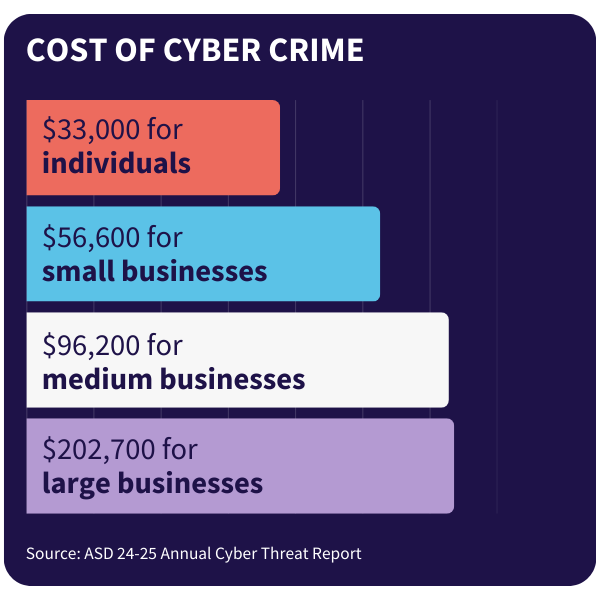
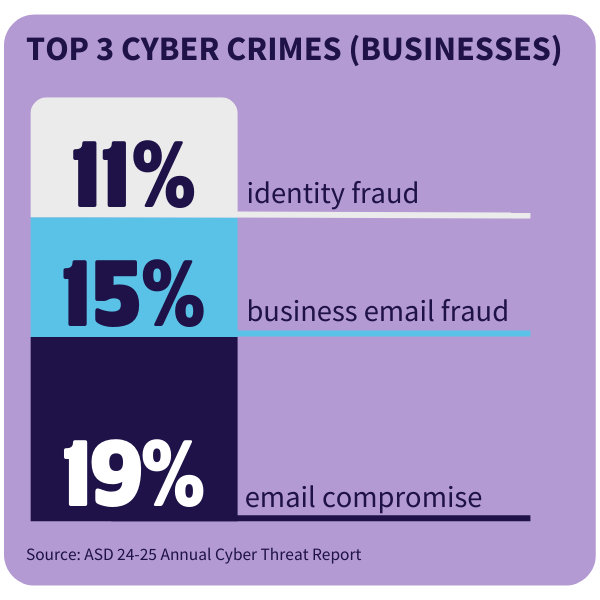
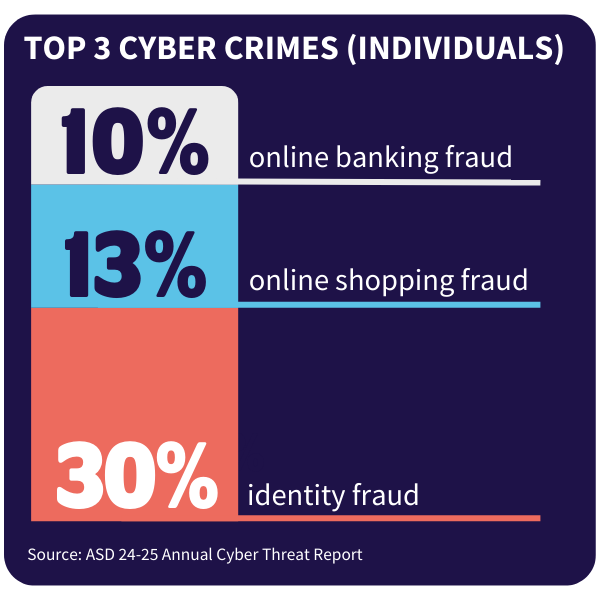
Stats show that cyber attacks are becoming more common – so it pays to be diligent. Check out some of the latest data from the Australian Signals Directorate (ASD) looking at the latest cyber threats affecting businesses and individuals.
Discover your career path in cyber security
Interested in joining the fight against cyber attacks? With a career in cyber security, you can find a range of career paths depending on your skills and interests. From cyber security analysts to ethical hackers, cyber engineers and governance, risk and compliance (GRC) specialists, there's a variety of different niches to discover in this unique field.
All of us rely on the internet for work, managing our personal finances, staying in touch with friends, exploring our interests and more. This means cyber crime affects almost every person and organisation in Australia. It's no wonder we need more cyber security professionals across every industry, whether education, healthcare, finance or retail.
A 2024 report from industry body Austcyber found that an extra 5000 workers every year is needed to avoid hitting a shortfall by 2030.

Why study cyber security?
Fill huge gaps in our workforce, with cyber security professionals in shortage across every state and territory in Australia.
Make a positive impact by fighting cyber crime – preventing people losing their money and personal information to theft.
Earn a decent living as an in-demand expert – cyber security analysts make between $100,000 and $120,000 on average.
Help fight cyber crime – study cyber security at VU
Did you know we are in the midst of a global skills shortage in cyber security? If you’re interested in IT or already working in the industry, consider further studies and become a cyber crime fighter.
- Build skills through practical learning in our world-class Cyber Security Training Centre
- Advance your knowledge through gamified challenges designed by global experts
- Access industry opportunities through VU partners like Oracle and Microsoft
- Skip the debt with Free TAFE* and pathways to advance to higher levels of study
Explore cyber security courses at VU
*Free TAFE is available to eligible students only. Free TAFE courses are free of tuition fees, but student services and materials fees still apply.